Why double bookings happen
Almost nobody double books through carelessness. It happens because of a gap in time and a gap in visibility.
Say you list four rooms on Booking.com, two of them on Airbnb, and all four on LekkeSlaap. That is ten separate calendars, each one only aware of itself. A guest books room 3 on Booking.com at 14:20. At 14:35 someone phones you about the same weekend. You check the diary on your desk — which was last updated this morning — and say yes.
The phone booking is where small guest houses lose money, and it is almost always a visibility problem rather than a platform problem. You said yes because you could not see, in one place, what had already been sold.
That is the specific gap calendar sync closes. It is worth being precise about the rest, so the section further down sets out plainly what syncing does not do.
What an iCal link actually is
iCal (properly, iCalendar) is the open file format calendars have used for decades — the same one behind the .ics invitations that arrive by email. A booking platform publishes each listing's calendar at a permanent web address, and any other system that knows the address can read it.
It is read-only and one-directional by design. The link lets other software see that calendar. It does not let that software change it.
What GHM Suite does with the link
Once a link is saved against a room, GHM Suite takes over:
- Checks every 15 minutes. A scheduled job on our servers re-reads each connected calendar automatically. Nothing needs to be open on your phone or your computer.
- Creates the booking against the right room. Each link belongs to one room, so an imported booking lands where it belongs, on the right dates, and shows up on your dashboard, your agenda and your availability search.
- Never duplicates. Every platform gives each reservation a unique ID, which GHM Suite stores and checks before creating anything. Syncing the same calendar ten times imports nothing the eleventh time unless it is genuinely new.
- Ignores blocked dates. Platforms publish owner-blocked periods as calendar events too. Those are filtered out, so a weekend you closed for maintenance does not arrive as a phantom guest.
- Pulls guest details where the platform provides them. LekkeSlaap includes a guest reference, so those bookings import with a real name, email and phone number. Airbnb and Booking.com anonymise their feeds, so those come in labelled as an Airbnb or Booking.com guest.
- Tells you about it. If you have notifications turned on, new imported bookings can reach you as a push alert — see our article on installing GHM Suite for how that works.
Setting it up, platform by platform
In GHM Suite, open your guest house, go to Manage Calendars, and add a calendar for the room you want to connect. Then fetch the link from the platform. The same instructions are built into the app — look for "Where do I find my iCal link?" — but here they are in full.
Booking.com
You are looking for a link containing ical.booking.com.
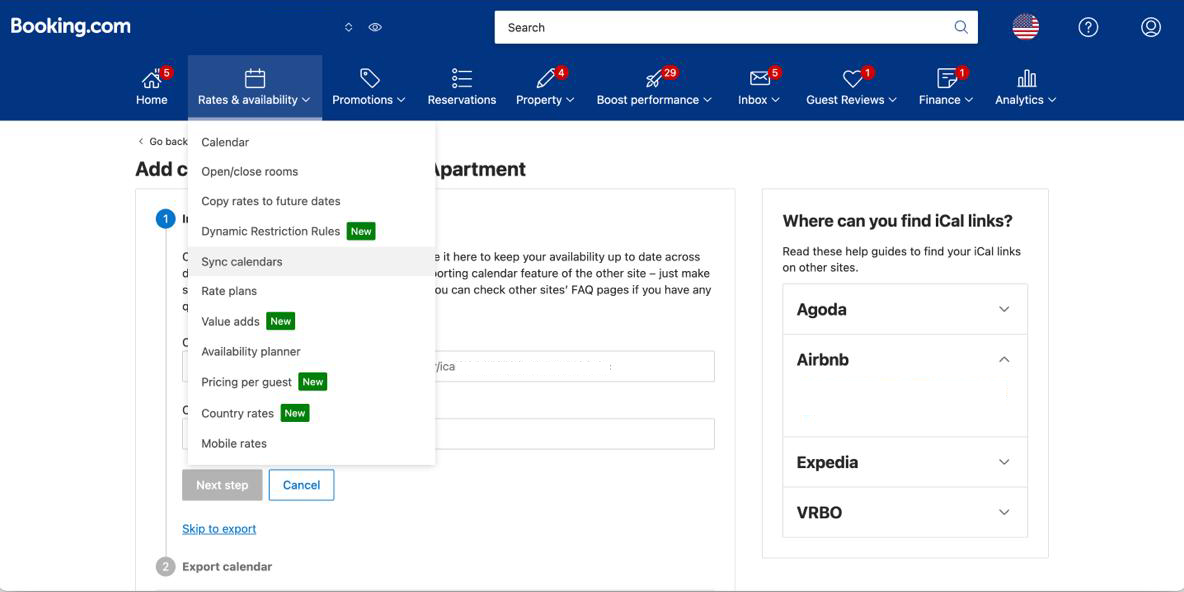
Open Sync calendars
Log in to the Booking.com Extranet (admin.booking.com). In the top menu, open Rates & availability → Sync calendars.
 Tap to enlarge
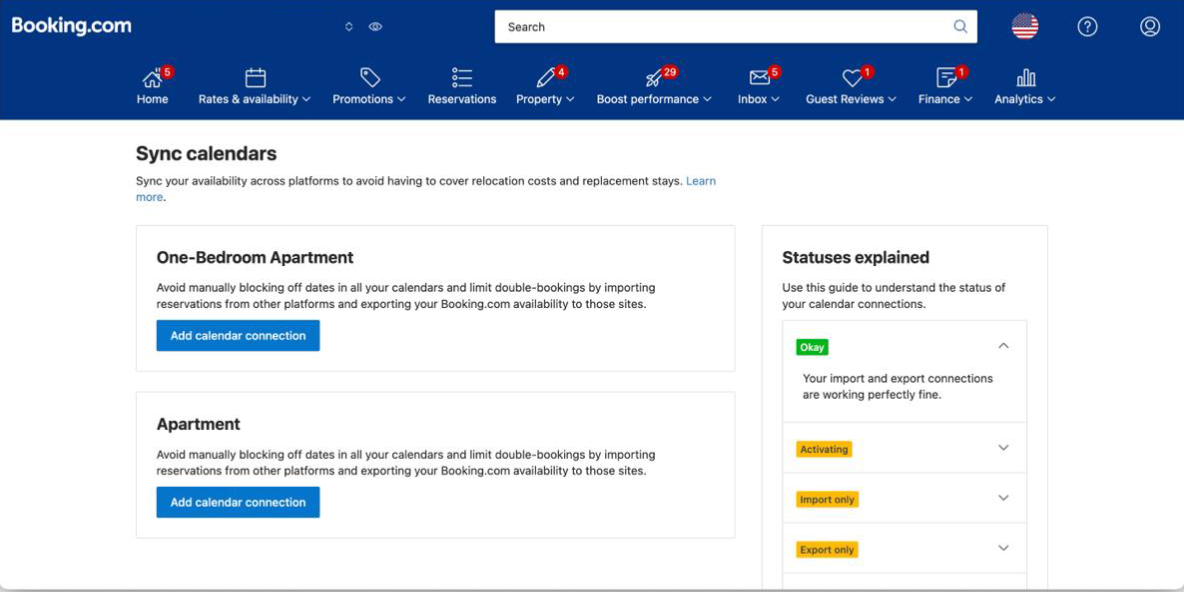
Add a calendar connection
Find the room or unit you want to sync and click Add calendar connection.
 Tap to enlarge
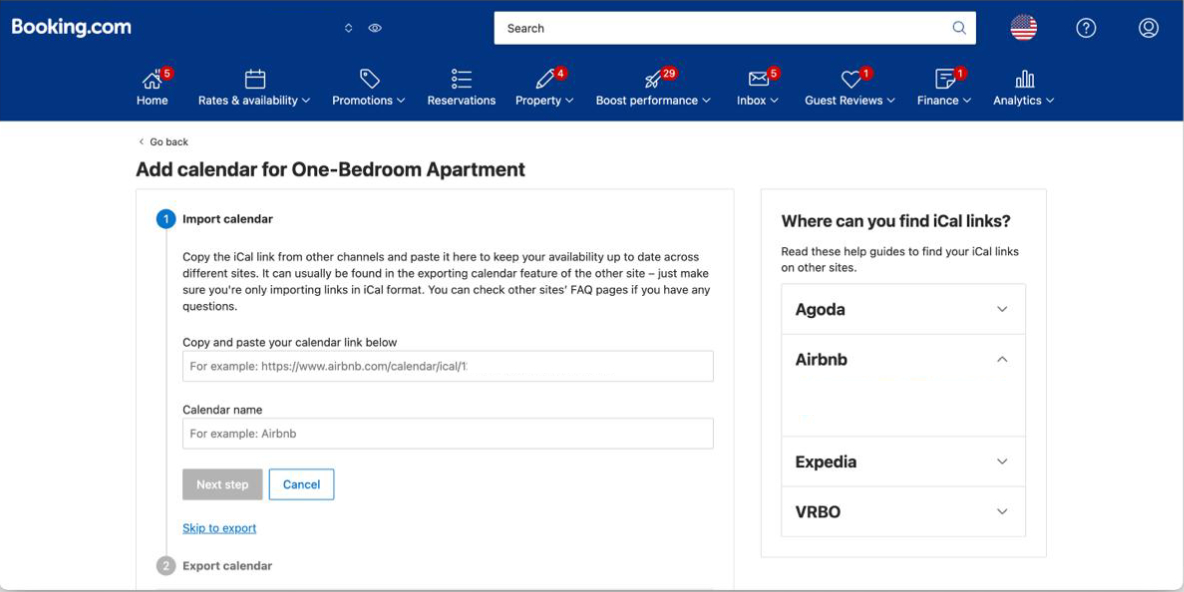
Skip straight to export
You’ll land on the Import calendar step. GHM Suite only needs the export link, so click Skip to export below the form.
 Tap to enlarge
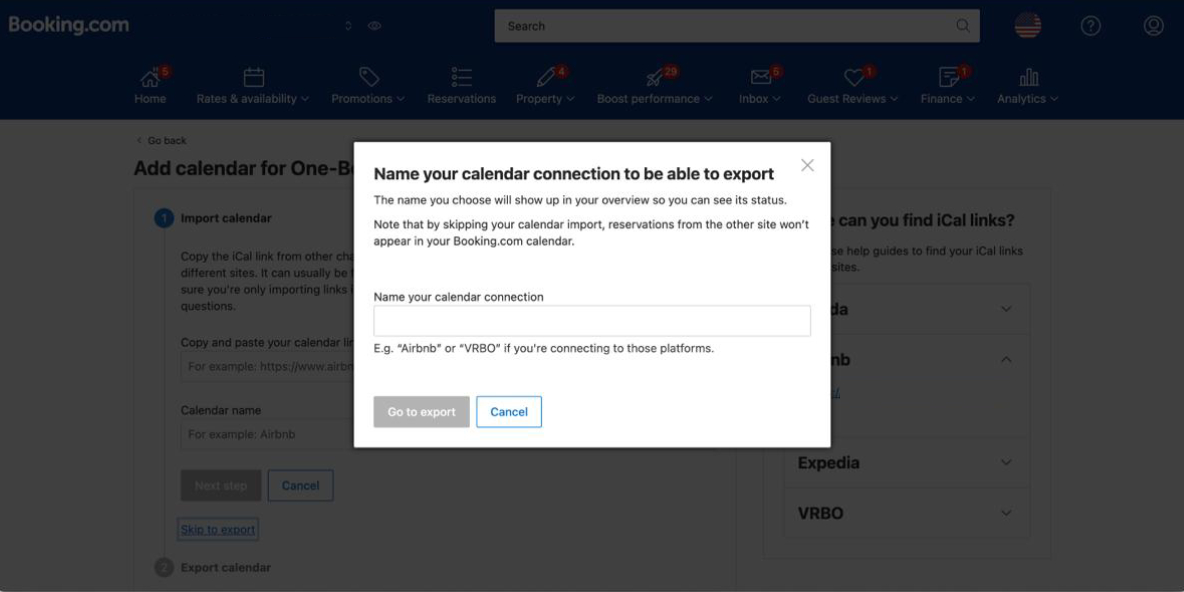
Name the connection
In the “Name your calendar connection” popup, type a name you’ll recognise (e.g. GHM Suite) and click Go to export.
 Tap to enlarge
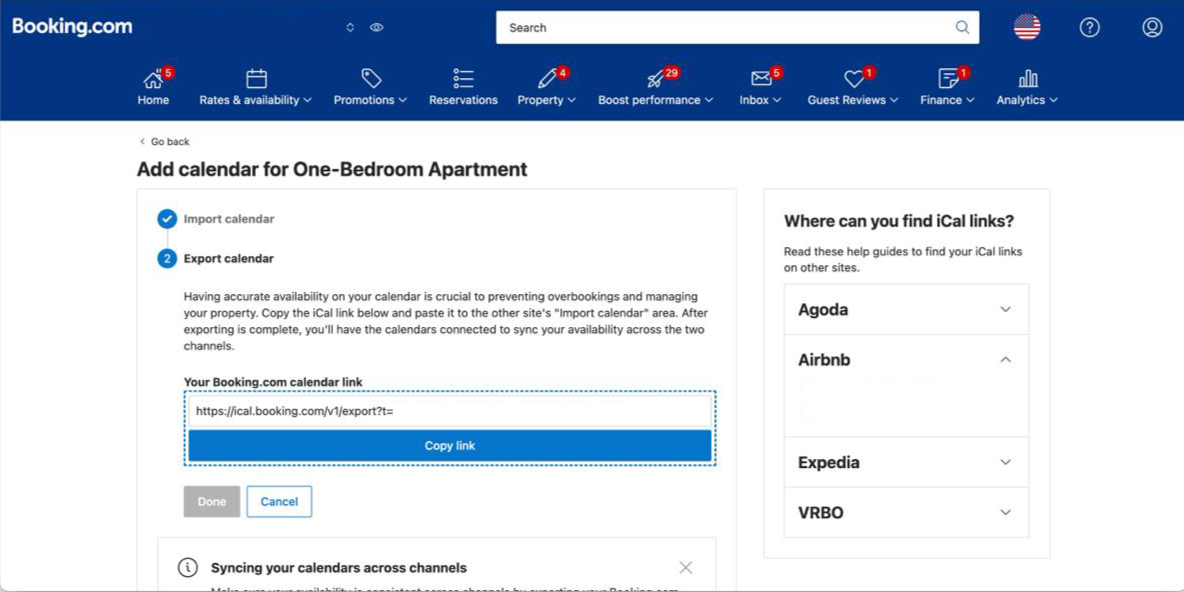
Copy the link into GHM Suite
Under “Your Booking.com calendar link”, click Copy link (it starts with https://ical.booking.com/…). Paste it into the iCal URL field in GHM Suite and save.
 Tap to enlarge
Airbnb
You are looking for a link containing airbnb.co.za/calendar/ical.
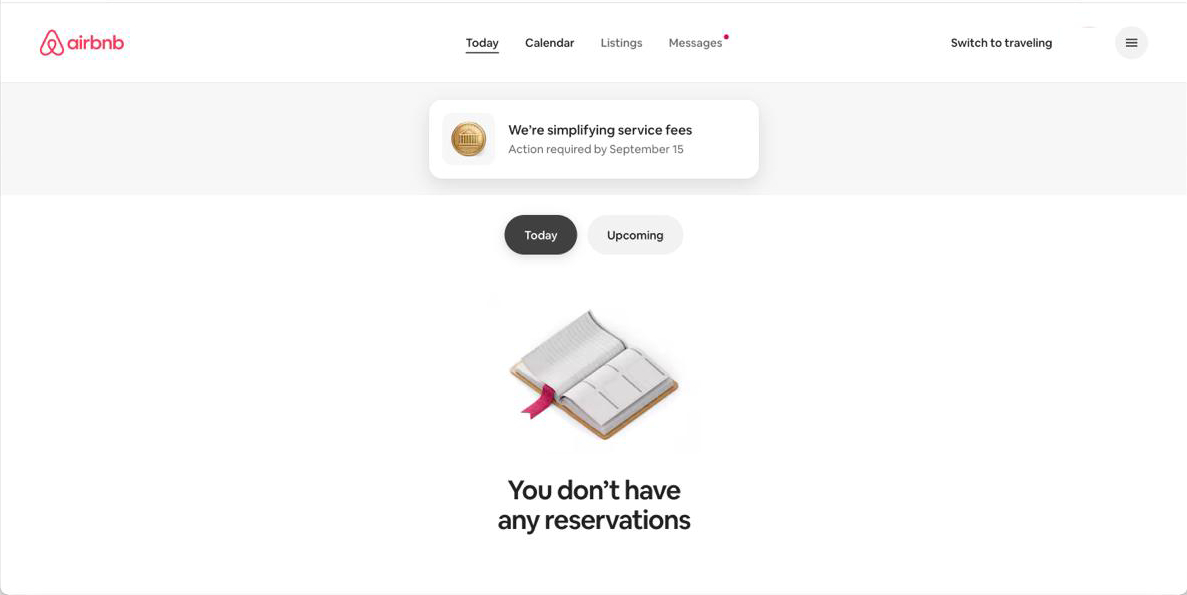
Open your Calendar
Log in to your Airbnb host account and click Calendar in the top navigation.
 Tap to enlarge
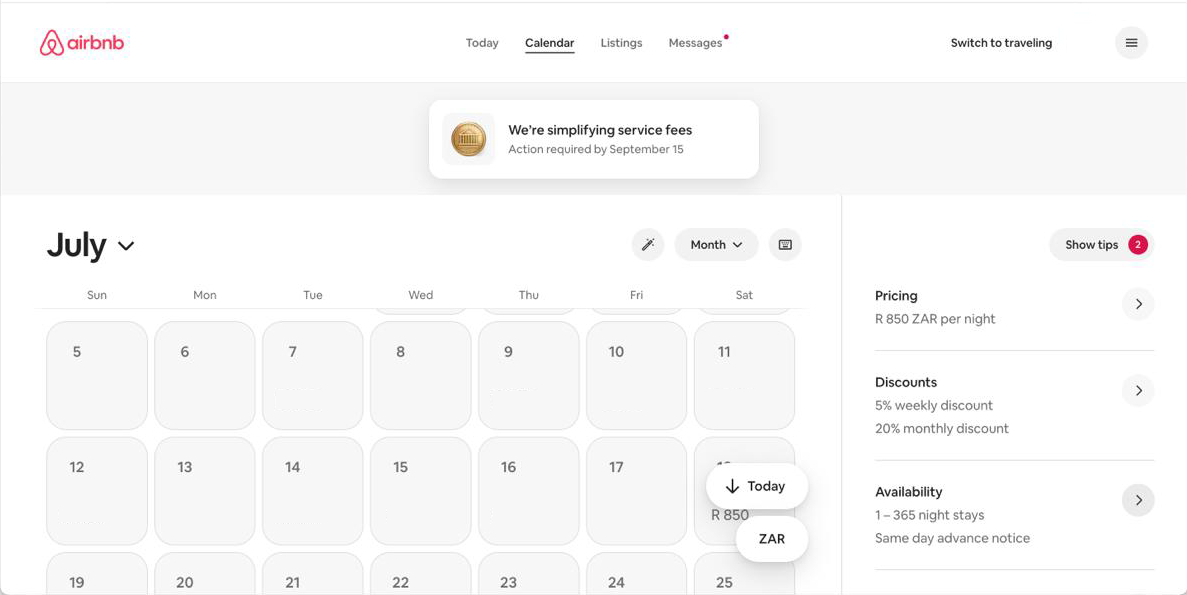
Go to Availability
If you have more than one listing, open the listing you want to sync. In the right-hand settings panel, scroll down to the Availability / Connect calendars section.
 Tap to enlarge
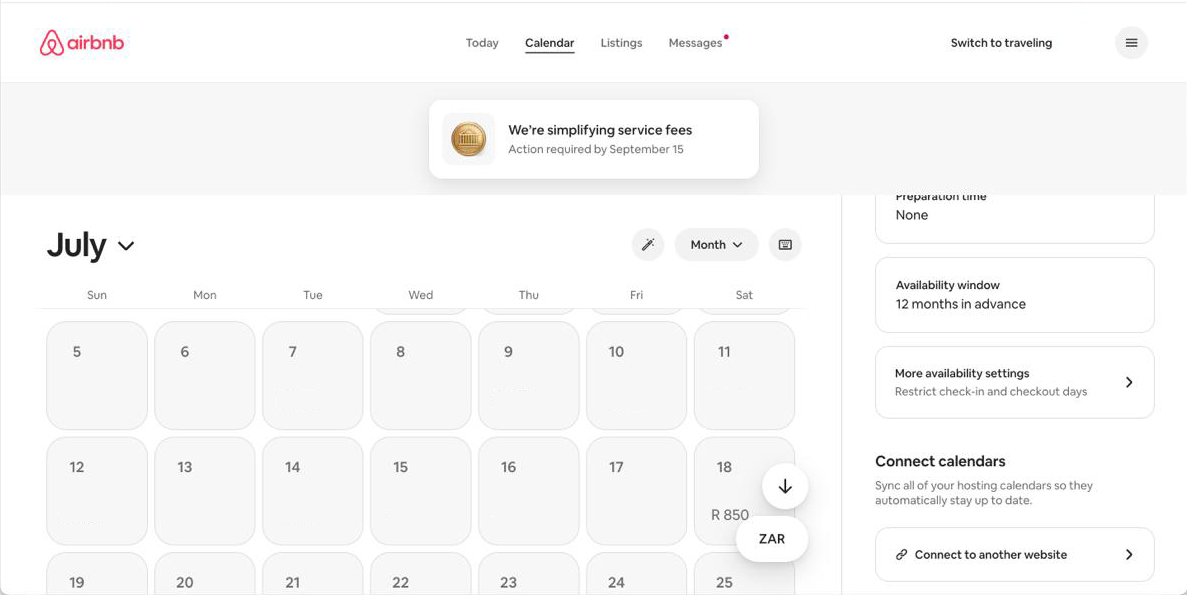
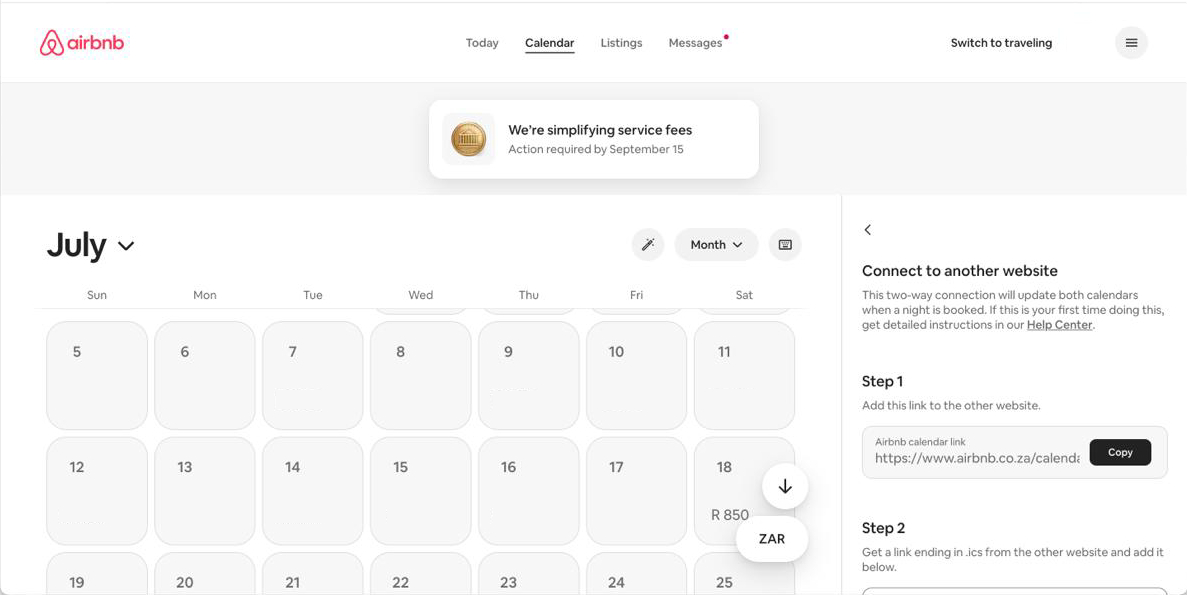
Connect to another website
Click Connect to another website.
 Tap to enlarge
Copy the link into GHM Suite
Under “Step 1 – Add this link to the other website”, click Copy next to the Airbnb calendar link (it starts with https://www.airbnb.co.za/calendar/ical/…). Paste it into the iCal URL field in GHM Suite and save. You can ignore Airbnb’s Step 2 — GHM Suite only imports.
 Tap to enlarge
LekkeSlaap
You are looking for a link containing lekkeslaap.co.za/suppliers/icalendar.
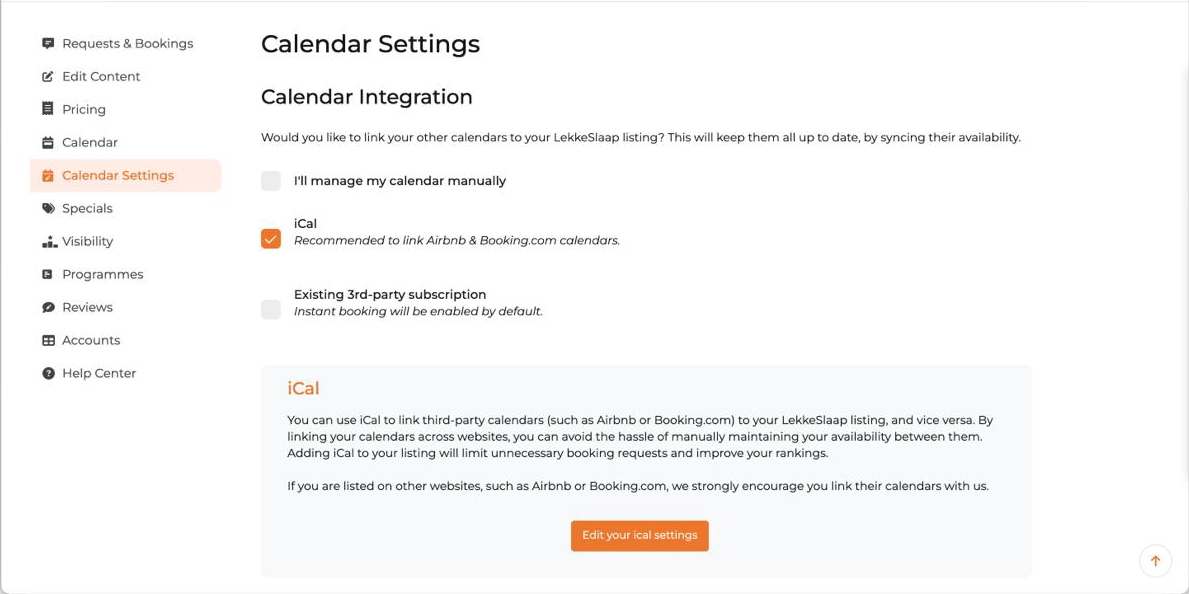
Open your iCal settings
Log in to your LekkeSlaap supplier dashboard. In the left menu click Calendar Settings, make sure iCal is selected, then click Edit your iCal settings.
 Tap to enlarge
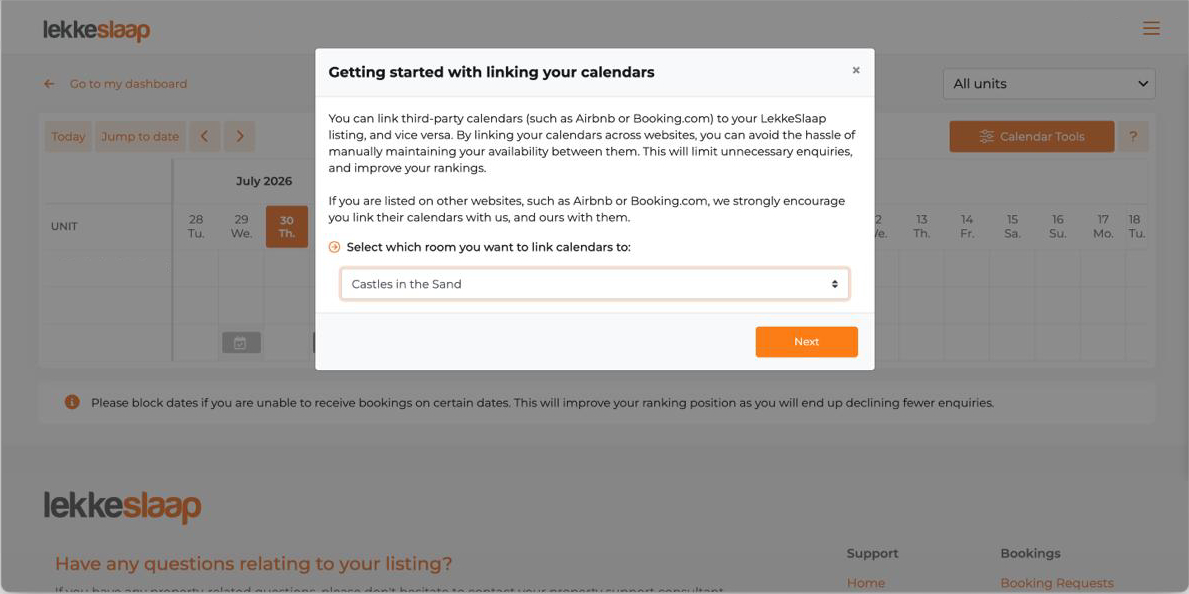
Select the room
In the “Getting started with linking your calendars” popup, choose the room you want to sync from the “Select which room” dropdown and click Next.
 Tap to enlarge
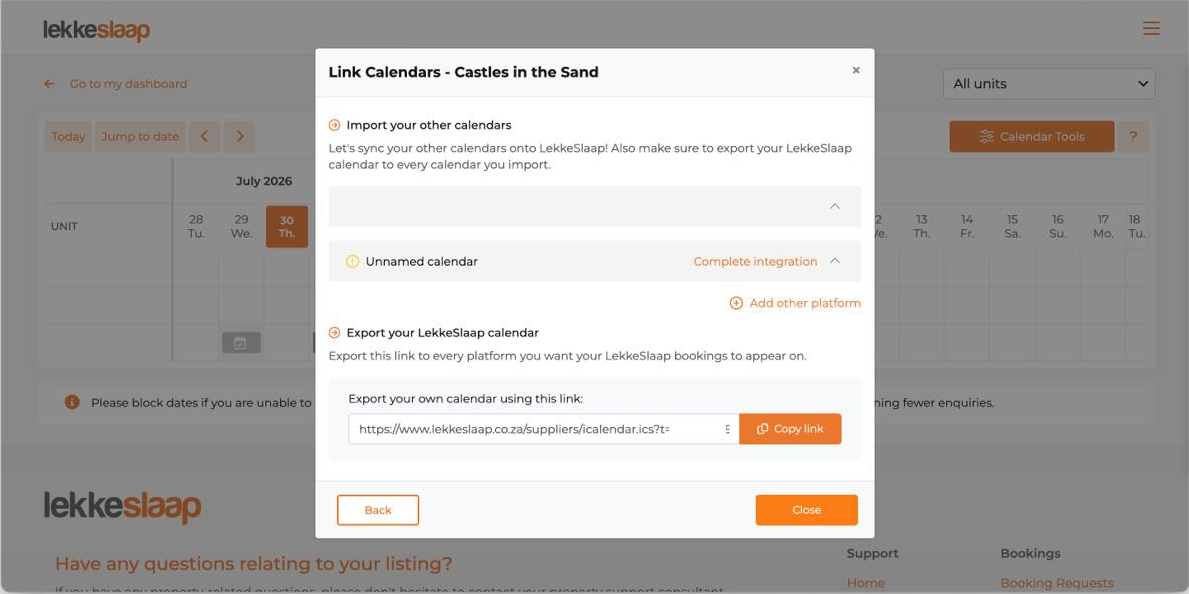
Copy the link into GHM Suite
Under “Export your LekkeSlaap calendar”, click Copy link next to “Export your own calendar using this link” (it starts with https://www.lekkeslaap.co.za/suppliers/icalendar.ics…). Paste it into the iCal URL field in GHM Suite and save.
 Tap to enlarge
Repeat for every room you have listed. A four-room guest house on all three platforms ends up with up to twelve links — tedious once, then never again.
What calendar sync does not do
This is the part most guides skip, and it is the part that decides whether the system actually works for you.
It does not push your availability back out
GHM Suite imports. It reads Airbnb, Booking.com and LekkeSlaap so you have one true view of your rooms — it does not write to them. A booking taken on Booking.com will not close that date on Airbnb because GHM Suite saw it. To close the loop between two platforms, connect those two to each other directly, using each one's import field.
It is not instant, anywhere
iCal is a polling format across the whole industry: every system re-reads every calendar on a timer. GHM Suite checks every 15 minutes, which is at the fast end, but the platforms themselves also refresh on their own schedules. Two bookings landing on two platforms within the same few minutes is a race no iCal setup can win.
It assumes standard check-in times
Calendar feeds carry dates, not times. Imported bookings are created with a 15:00 check-in and an 11:00 check-out. The nights are right; if a particular guest is arriving late or leaving early, edit the booking after it lands.
It depends on the link staying valid
If you delete and recreate a listing, or a platform reissues your calendar address, the old link quietly stops returning anything. It does not error loudly — it just goes still. Worth a glance whenever you restructure your listings.
Three habits that close the remaining gap
- Check GHM Suite before you confirm anything by phone or WhatsApp. This is the whole point of the exercise. The Check Availability search takes a few seconds and covers every room and every platform at once.
- Capture direct bookings immediately. A booking that only exists in your head or on a notepad is invisible to every system you own. Enter it while the guest is still on the phone.
- Re-check your links after any listing change. New room, renamed unit, relisted property — re-copy the iCal link.
When something looks wrong
| What you are seeing | Most likely cause |
|---|---|
| Nothing imported at all | The link is an import field's address rather than the platform's export link, or it was truncated when copied. Re-copy it with the platform's own Copy button. |
| Bookings landed on the wrong room | The link for one room was saved against another. Each listing has its own distinct calendar address — check them against the room names on the platform. |
| Guests all show as "Airbnb Guest" or "Booking.com Guest" | Expected. Those platforms do not publish guest details in the feed. Open the reservation on the platform for contact details. |
| Dates you blocked yourself appear as bookings | Some platforms label blocked periods differently than others. Send us the calendar and we will look at it. |
| It worked and then stopped | The listing was probably recreated or the calendar reissued on the platform. Fetch a fresh link and replace the old one. |
Common questions
What is an iCal link?
An iCal link is a web address that publishes a calendar as a file other software can read. Every major booking platform gives you one for each listing. Paste that link into GHM Suite and the bookings on that platform appear in your GHM Suite calendar automatically.
How often does GHM Suite check for new bookings?
Automatically, every 15 minutes. You can also trigger a sync by hand from the Manage Calendars screen if you have just made a change on a platform and do not want to wait.
Does connecting my calendar block the dates on Airbnb and Booking.com too?
No. GHM Suite imports bookings from those platforms so you can see everything in one place, but it does not write availability back to them. Blocking a date on Airbnb so Booking.com cannot sell it still has to be done on those platforms, or by connecting them to each other directly.
Do I need one iCal link per room or one per property?
One per room. Each platform publishes a separate calendar for each room or unit you list, and in GHM Suite each of those links is attached to the matching room. A guest house with four listed rooms on Booking.com will have four Booking.com links.
Why do imported Airbnb and Booking.com bookings not show the guest name?
Because those platforms do not put guest details in their calendar feed — the events are effectively anonymous. GHM Suite labels them as an Airbnb or Booking.com guest so you know where the booking came from. LekkeSlaap does include the guest reference, so those bookings import with a real name, email and phone number where available.
Will syncing twice create duplicate bookings?
No. Every imported booking keeps the unique ID the platform gave it, and GHM Suite checks that ID before creating anything. Re-running a sync on the same calendar imports only what is genuinely new.
Stuck on a particular link? Send us a message — a real person in South Africa will answer, and we have seen most of the odd cases by now.