Why the rate never arrives
When you connect a platform to GHM Suite you paste an iCal link — the same open calendar format behind the meeting invitations that land in your email. That format was designed to answer one question: is this period taken or free?
So the feed carries a start date, an end date and a reference. It does not carry a price, a guest count, a payment method, or in most cases even a name. That is not a gap in GHM Suite: any system reading those feeds gets exactly the same three things. Airbnb and Booking.com go further and deliberately anonymise their events, which is why imported bookings from them show as "Airbnb Guest" or "Booking.com Guest" rather than a real person.
The upshot is simple, and worth saying plainly: the platforms tell GHM Suite when your rooms are busy. Only you can tell it what they earned.
What an imported booking looks like on arrival
Here is exactly what you get, and what is left for you.
| Field | On arrival | Why |
|---|---|---|
| Check-in & check-out | Correct | The one thing the feed is actually for. |
| Room | Correct | Each platform publishes one calendar per room, tied to the room you linked it to. |
| Guest name | A placeholder | Airbnb and Booking.com anonymise their feeds. LekkeSlaap does include a reference, so those import with a real name. |
| Rate per night | Empty | Not carried by the format. This is the one that matters most for reports. |
| Number of guests | Zero | Not carried by the format. |
| Payment method | Empty | Not carried by the format. |
| Paid | Switched on | Assumed, on the basis that the platform collected the money. Switch it off if you take payment on arrival. |
What stays blank until you fill it in
Your reports are built by adding up what is on each booking, night by night. A booking with no rate contributes R 0 to every night it covers. A booking with no guest count contributes nobody. Nothing is broken — there is simply nothing to add up.
Income and the income chart
Total income is the sum of the nightly rate across every night in the period. Without rates, the chart is a flat line along the bottom and the total reads R 0 — even in a month you were fully booked.
Platform commission and net income
Commission is worked out from the rate, so a booking without one is skipped entirely rather than estimated. A half-filled month therefore understates what Booking.com and Airbnb actually took, which makes net income look better than it is.
Month-end predictions
The month-to-date forecast projects the month you are having from the earnings so far. Fed zeroes, it forecasts zero. This is the number most owners actually want, and it is entirely downstream of the rate.
Guest numbers
The guests chart counts the people staying each night. Left at zero, it stays empty — and average booking value, which divides income by bookings, is wrong for the same underlying reason.
How to fill in a booking
Open your property and stay on the Rooms tab. Then:
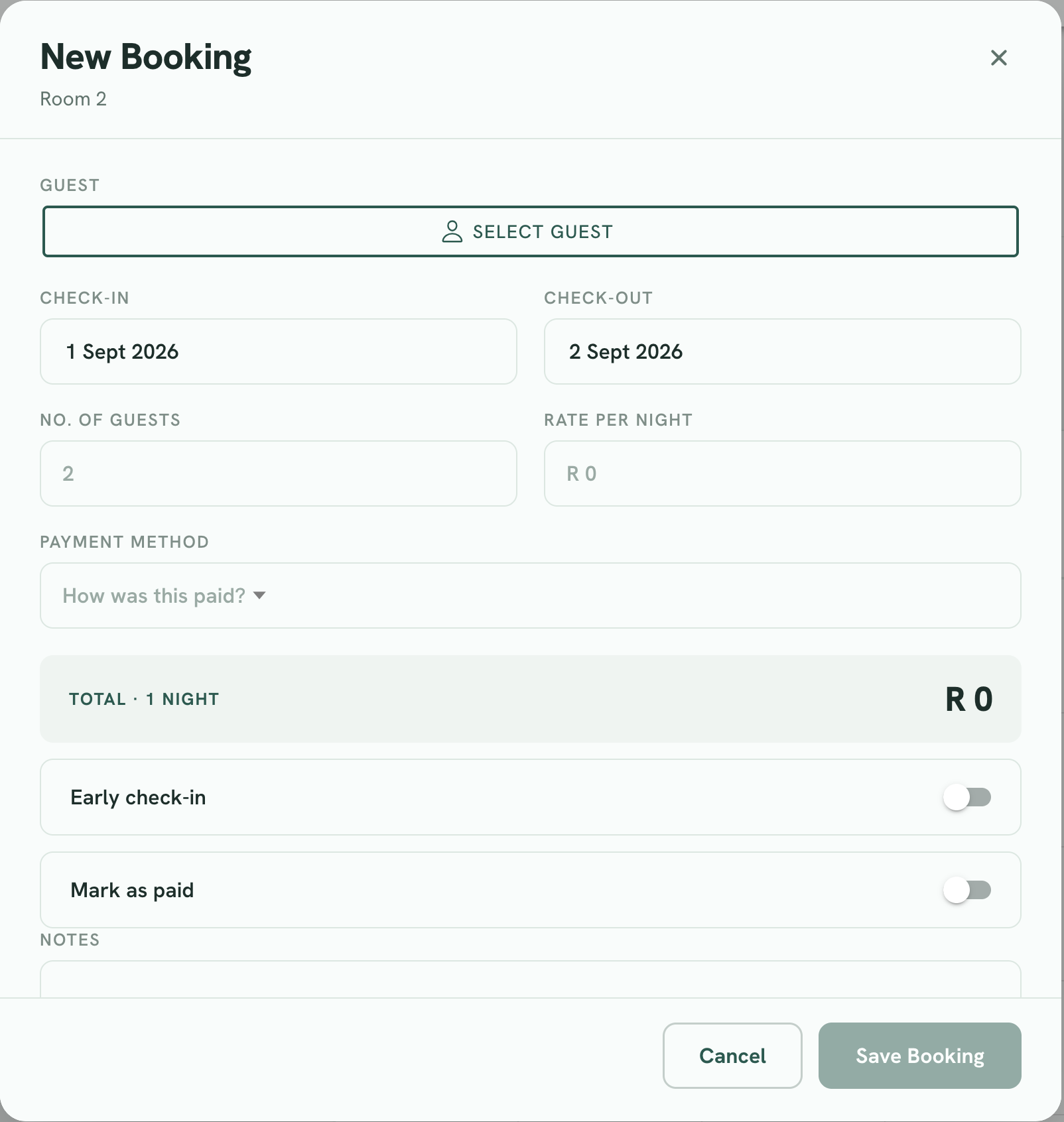
Find the booking
Tap it in the calendar, or switch to Agenda view and tap its row. Agenda is usually faster when you are working through a batch, because it lists bookings one after another instead of making you hunt across a grid.
The Edit Booking window opens
One tap — there is no separate "view" step. The dates and room are already filled in from the platform, so leave those alone unless something genuinely moved.
Enter the rate per night
This is the field that unlocks the reports. Enter what one night costs, not the total for the stay — GHM Suite does the multiplication. Watch the Total line underneath: it shows nights × rate as you type, so you can check it against the payout the platform is showing you.
Set the number of guests
Imported bookings start at zero. The platform's reservation page tells you how many people are coming.
Check “Mark as paid” and the payment method
Imported bookings arrive marked as paid. If the platform collected the money, that is correct — set the payment method to match. If the guest settles with you on arrival, switch Mark as paid off so the booking shows up on your unpaid list.
Add the guest, and anything else worth remembering
Replace the "Airbnb Guest" placeholder with the real person if you have their details, and use Notes for the things that make a stay go smoothly — a late arrival, a cot, a dietary requirement.
Save
The reports pick it up straight away. Open the Reports tab and you will see the night you just priced appear in the chart.
Making it a habit rather than a chore
- Do it weekly, not monthly. Ten minutes on a Monday over a week's imports beats an hour of archaeology at month end, when you can no longer remember what anyone paid.
- Work from Agenda view. It lists bookings in order, so you can go down the list without hunting through the calendar.
- Price direct bookings as you capture them. A booking you enter yourself already has the rate field in front of you — filling it in then costs nothing and saves the second pass.
- Fill in the current month first. If you want the year-on-year comparison, work backwards from there once you are caught up.
Common questions
Why do rates not come through from Booking.com, Airbnb or LekkeSlaap?
Because the calendar feed those platforms publish is a calendar, not an invoice. The iCal format carries events — a start date, an end date and a reference — and nothing about money or guest numbers. No system reading those feeds receives the rate, so this is not something GHM Suite can switch on.
Is the rate field the total for the stay or the price per night?
Per night. Enter what one night costs and GHM Suite multiplies it by the number of nights. The Total line under the field shows that calculation as you type, so you can check it against the payout the platform shows you.
Why do imported bookings already show as paid?
An imported booking is marked paid on the assumption that the platform collected the money. If you take the payment yourself on arrival, switch "Mark as paid" off when you edit the booking so your unpaid list stays accurate.
Do I have to go back and fill in every old booking?
Only if you want the reports for those periods to be right. Reports are built from whatever is on each booking, so past months stay blank until their bookings have rates. Most owners fill in the current month, then work backwards if they want the year-on-year comparison.
Which reports change once I add the rate?
Total income, average booking value, the income chart, platform commission, net income after commission, and the month-end prediction. Commission in particular is skipped entirely for any booking with no rate, so a part-filled month understates what the platforms took.
Does occupancy need the rate too?
No. Occupancy is worked out from the dates and the room, both of which arrive in the feed, so it is correct from the moment a booking imports. It is the one number you can trust before you have edited anything.
Not sure what a particular platform paid you, or seeing something in your reports that does not add up? Send us a message — a real person in South Africa will answer.